hx-keep
Keep your htmx client state persistent across refreshes, new windows, and re-opening of your pages - as simple as:
<div id="logs" hx-keep="first 3">...</div>
<form id="my-form" hx-keep="form">...</form>
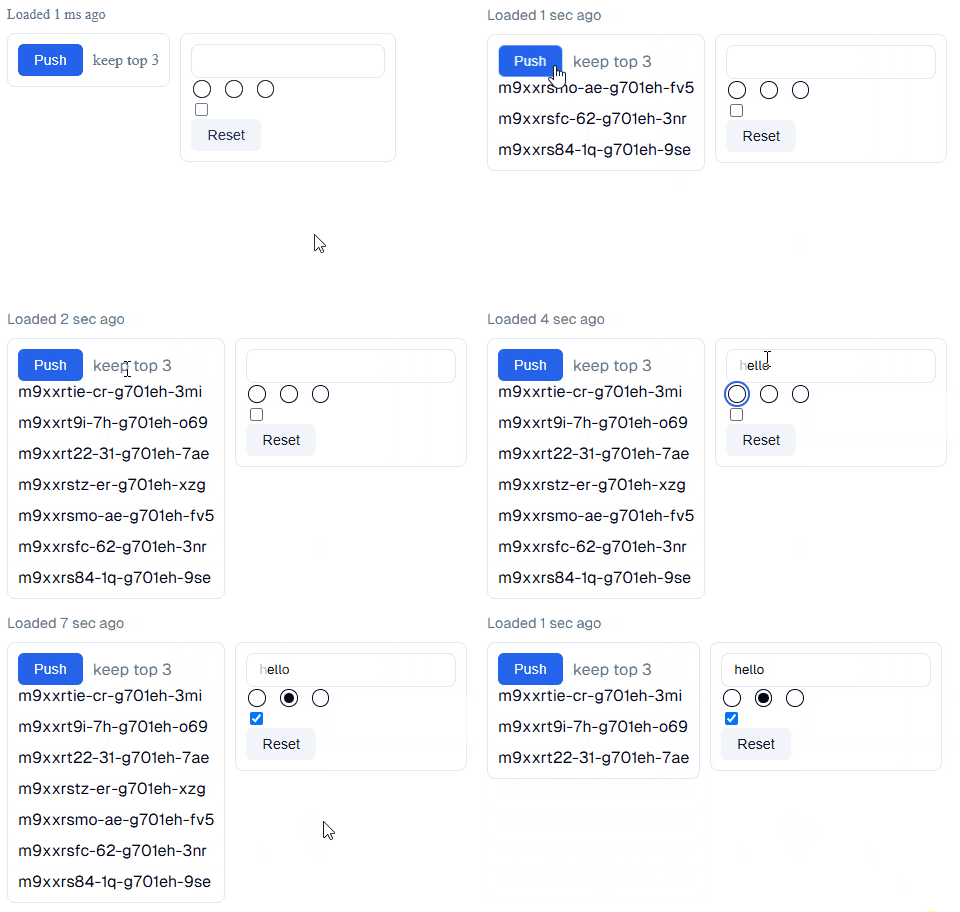
We also include bindings to allow client side code to read/write into the hx-page data for custom form elements, see examples.
Getting Started
CDN
<script src="https://unpkg.com/hx-keep@1.1.1"></script>
Bundle
To bundle in an npm-style build system with ES modules, you will have to add htmx to the document like so:
npm i hx-drag
// index.js
import "./htmx";
import "hx-keep";
// htmx.js
import htmx from "htmx.org";
window.htmx = htmx; // to support hx-drag
export default htmx;
Enable
<body hx-ext="hx-keep">...</body>
HTML Attributes
All html attributes can have the data- prefix if required by your framework.
hx-keep="{mode}"
This attribute specifies which data to store and restore from based on the mode set
| Mode | Description |
|---|---|
innerHTML |
Will keep the entire outer html of the element |
outerHTML |
Will keep only the inner html of the element |
first x |
Will keep only the first x elements inside the main element. To prevent cutting in weird places we recommend wrapping items in a <div style="display:contents;"> so you can control where it cuts. |
last x |
Same as first but takes the last elements |
form |
Tracks and restores only the form values, rather than the entire html |
If you want to cache only a single input, we recommend wrapping it in a:
<form id="form" style="display: contents" hx-keep="form"><input name="myValue"></input></form>
hx-keep-key
Used to tell hx-keep how to identify the element, especially useful if it is shared across multiple urls or locations.
If the key is not specified, hx-keep will assume the key is ${url.pathname}#${element.id}.
If both the key and id are not specified on the element, then the whole element will be ignored.
hx-keep-hash
The hash is just a simple string value, and if the hash on the element, and the hash of the stored data do not match, then the element will not be restored. This can be helpful if you want to ensure content from an old format is not being restored into a new layout when you update your site.
You could also use this as a date-stamp, so if the underlying data in a form changes it throws away the client cached form.
hx-keep-restore="off"
If set to off, then hx-keep will not restore, however it will still save when changes are made.
This can be helpful if on a specific load you want it to not restore from cache, and instead override with the server’s contents.
hx-keep-evict
Identical behaviour to the HX-Keep-Evict header, however you can also include the value directly in any element for it to take affect when mounted by htmx.
hx-keep-expiry
How long until the value should be cleared from local storage? Defaults to 30 minutes if unspecified. This must be an integer value with a postfix for the units.
| Postfix | Description |
s |
Seconds (i.e. 30s) |
h |
Hours |
d |
Days |
Note:
hx-keepwill not automatically clear the data as soon as they expire, it will only prune data when a window is started
hx-history="false"
This library will respect hx-history, and omit any inputs or elements with this attribute when saving it’s data.
CSS Classes
hx-keep
If an element has this class if means it is being cached by hx-keep and does not match what the server originally sent.
In the case of a hx-keep="form", this class will update as the form values are changed allowing for save state indicators based on whether the input is actually different from what was originally served.
Http Headers
Request: HX-Keep-Key
If a htmx request is triggered from an element with a hx-keep-key, that value will be included in the request sent to the server.
This is helpful in combination with the hx-keep-evict header to clear a value from hx-keep after it has been submitted to the server.
Request: HX-Keep-Hash
Similar to HX-Keep-Key, but instead will include the hx-keep-hash value as a http header.
Response: HX-Keep-Evict
When a response with this header is received by the client, it will evict all hx-keep data where the key matches the pattern(s) supplied. This occurs before rendering meaning these values will be gone before any potential restoration by hx-keep.
The patterns are comma separated and then have their whitespace trimmed before matching.
There is only one type of wildcard supported which is the * which matches with zero to many characters (i.e. /logs/*/short/*).
JS API
Context
Get
window.hx_keep.getValue = (ctx: Element | string | null, name: string): string | null;
Going from the provided element it will find the hx-keep form it is within, then return the value in the form.
Set
window.hx_keep.setValue = (ctx: Element | string | null, name: string, value: string, expiry?: number): void;
Will go from the provided element and find the relevant hx-keep form, then set the provided form value.
It will also change the expiry if provided (time from now in milliseconds).
If expiry is unspecified it will continue with the currently expiry for the key. However when specified it must be measured in seconds from now.
Get Form
Same as getValue() but returns the whole form as Record<string, string>
Set Form
Same as setValue() but takes the whole form as Record<string, string>
Evict
window.hx_keep.set = (pattern: string[] | string) => void;
Will delete the hx-keep entries which have the keys that match the pattern(s) given.
The patterns can use * to signify zero-many characters (i.e. /logs/*/short/*).
Prune
window.hx_keep.prune = () => void;
This will delete all of the expires entries.
Shrink
window.hx_keep.shrink = () => void;
Will prune(), if no entries are removed it will delete the oldest one.
This is useful if you have ran out of localStorage capacity
Clear
window.hx_keep.clear = () => void;
Deletes all hx-keep data, this is useful for ensuring all data is removed on logout.
Though you could also use a http hx-keep-evict: * header for this purpose
Is Saved
window.hx_keep.isSaved = (ctx: Element | null): boolean;
Returns if the hx-prep context is different from the original server content or not